TL;DR: Most guides to building an AI agent skip the part that actually matters: teaching it when to decide something versus when to just execute a command. Using document processing as the working example, this piece breaks down the Hands/Brain Technique, a clean split between an AI that reasons and a tool layer that executes reliably, then walks through the real build, step by step.
If you're trying to figure out how to create an AI agent instead of shipping another button-based tool, document processing is one of the cleanest places to start, and PDFs are one of the messiest formats to start on.
PDF software has spent decades giving people buttons.
Rotate. Split. Merge. Compress. OCR. Reorder. Convert.
Those buttons are useful, but they all assume the user already knows what needs to be done. Someone has to look at the document, understand what's wrong with it, and decide which button fixes it. That decision has always been the expensive part. The click was never the bottleneck.
The more interesting possibility is to let an AI agent make that decision for you.
Instead of manually inspecting a 200-page document to figure out which pages need rotating, which are duplicates, which are blank, whether OCR is required, and how the final file should be packaged, you say:
"Clean this document up and make it ready for review."
The agent figures out the workflow. A PDF processing service executes it.
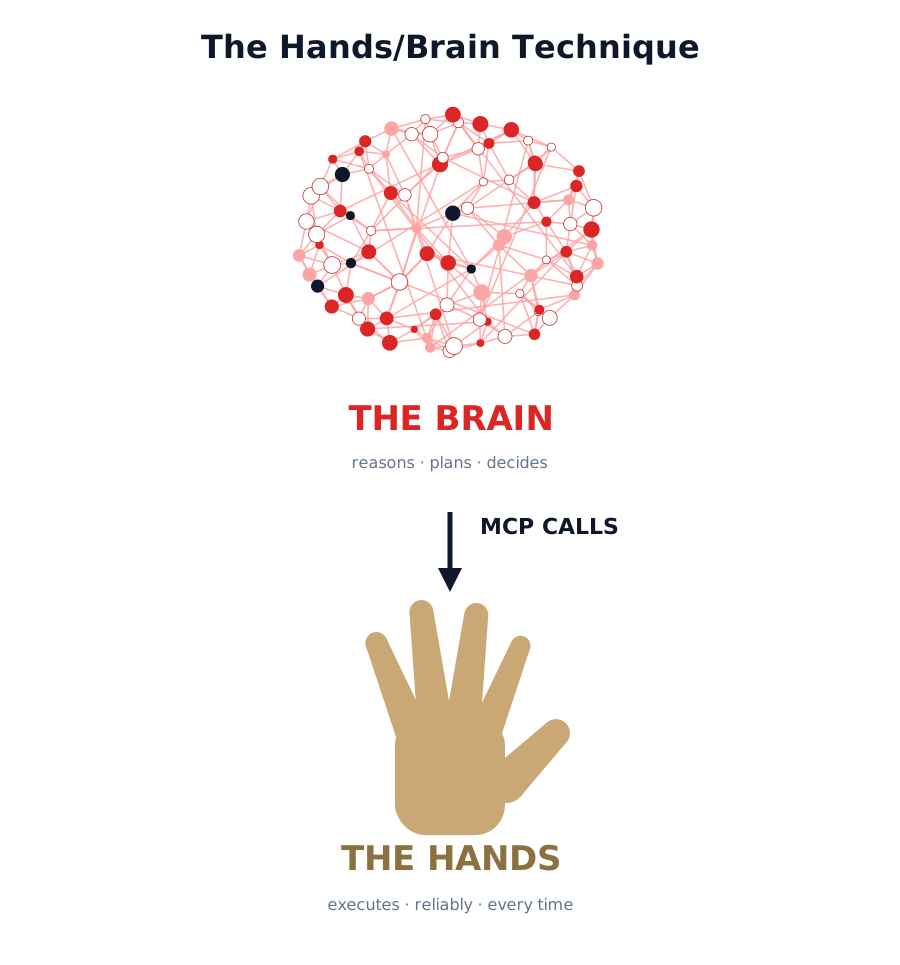
That split, an AI that decides and a PDF system that executes, is what I'll call the Hands/Brain Technique. It's the idea underneath everything in this piece, so it's worth naming and defining once, clearly, before we get into the details.
The Hands/Brain Technique: the AI is the brain. It looks at a messy document, reasons about what's actually wrong with it, and decides what should happen. The PDF infrastructure is the hands. It doesn't reason about anything. It just executes deterministic operations reliably, on command, every time. Neither side tries to do the other's job.
This is where a remote PDF MCP server such as PDFHaul becomes interesting, because it's built to be the hands in exactly this arrangement.
From PDF Utilities to the Hands/Brain Technique
A PDF API traditionally works like this:
Application
↓
PDF API
↓
Operation
↓
Result
The application has to decide what operation to call. All the judgment lives upstream, usually in a human.
The Hands/Brain Technique changes the architecture:
User
↓
AI agent (the brain)
↓
Analyze document
↓
Decide what needs to happen
↓
PDF tools (the hands)
↓
Clean document
The difference is subtle but important. The PDF processing system doesn't have to become intelligent. The AI doesn't need to know how to manipulate PDF internals. Each side does what it's good at. The brain provides judgment. The hands provide execution.
PDFHaul's MCP interface is built around exactly this kind of tool-based interaction, exposing PDF operations to MCP-compatible clients such as Claude and Cursor.
Consider Page Rotation
Take something seemingly trivial: rotating pages.
A conventional PDF API can rotate page 17 by 90 degrees. But it doesn't answer the more important question: should page 17 be rotated?
That's a perception and judgment problem, and it belongs to the brain, not the hands.
Consider a document containing:
● 40 portrait pages
● 3 scanned pages that are sideways
● 2 intentionally landscape tables
● 1 page that is upside down
A simplistic automation system could rotate every landscape page. That's wrong. It would flip the two tables that are landscape on purpose, breaking the one part of the document that was already correct.
A brain that's actually reasoning about the content would instead conclude something like: pages 12, 18, and 31 appear to have their text orientation rotated relative to the rest of the document. Page 24 is intentionally landscape because it contains a wide table, and should be left alone.
It would then hand the hands a precise instruction:
rotate_pages(
pages=[12, 18, 31],
degrees=90
)
The PDF service doesn't need to understand the meaning of the document. It just needs to reliably perform the operation it's told to perform. All the intelligence sits above the tool, exactly where the Hands/Brain Technique says it should.
Rotation Is Only the Beginning
Once you think about PDF processing this way, a much larger set of possibilities appears.
Imagine uploading a document and asking: "Prepare this for our document management system."
The brain might discover:
● 4 blank pages
● 3 exact duplicate pages
● 6 incorrectly oriented pages
● 17 pages requiring OCR
● an unnecessarily large file
● pages that are out of sequence
It could then construct a workflow and hand each step to the hands in order:
detect problems
↓
remove blank pages
↓
remove duplicates
↓
correct orientation
↓
OCR scanned pages
↓
reorder pages
↓
compress
↓
return final document
None of those individual operations requires an AI. Compression doesn't require intelligence. OCR doesn't require intelligence. Removing a blank page doesn't require intelligence. The interesting part is that the brain decided which operations were necessary, in what order, and why. That sequencing is the whole value of the Hands/Brain Technique. Take it away and you're back to a person clicking eight separate buttons in the right order and hoping they didn't miss one.
When You Don't Need an Agent
A consumer asking "rotate this PDF" doesn't need an agent. A button is better. It's faster, cheaper, and there's no ambiguity to resolve.
But consider a company receiving thousands of documents from different sources. Some arrive as scans. Some are upside down. Some contain blank pages. Some have duplicate pages. Some contain tables that need to become spreadsheets. Some need to be converted to Word. Others simply need to be compressed before being uploaded to another system.
Now the problem isn't really PDF editing. It's document intake. And document intake is a perfect environment for the Hands/Brain Technique, because the volume and the variety are exactly what makes per-document human judgment too expensive to scale.
Accounts Payable: What It Actually Looks Like
Consider an accounts-payable department receiving invoices from hundreds of vendors, dozens of formats, no consistency at all.
A document arrives as invoice.pdf. Inside, it's a terrible scan, slightly rotated, with a coffee-ring stain across the header.
Here's what actually happens when the Hands/Brain Technique runs on it, step by step, rather than as an abstract list of capabilities:
The brain opens the document and immediately flags that the text layer is missing entirely. It's a scan, not a native PDF, so nothing is searchable and nothing can be extracted yet. It decides OCR is necessary and instructs the hands to run it.
While inspecting the page geometry, the brain notices the scan is rotated 4 degrees off true and the invoice table itself is tilted. It corrects the orientation before OCR runs, because OCR accuracy on a tilted scan is meaningfully worse.
Once OCR completes, the brain looks at the resulting text and structure and identifies a table: line items, quantities, unit prices, a total. It routes this to table extraction rather than treating it as flat text, because flattening it would lose the row/column relationships the accounting system needs.
The brain checks the extracted total against the sum of line items. They match, so it proceeds automatically. If they hadn't matched, this is exactly the kind of thing that gets escalated instead of silently accepted, more on that below.
Finally, the brain preserves the original scanned document unmodified, alongside the cleaned, searchable, structured version, and sends the structured data to the accounting system for reconciliation.
The mechanical operations, OCR, rotate, extract, compress, are the hands. Determining that this particular invoice needed OCR before extraction, that the tilt needed correcting first, and that the totals needed a sanity check, that's the brain. A separate extraction and reconciliation layer handles the business logic. The agent is the coordinator between the two, and the person who used to do all of this by eye for every single invoice gets their afternoon back.
Insurance Claims: One File, Start to Finish
Insurance is maybe the clearest example, so it's worth walking through a single claim from start to finish instead of describing the category in the abstract.
A policyholder submits a claim after a kitchen fire. The submission arrives as one 7-page PDF, because that's how their phone's scanning app packaged it.
Page 1 is the claim application form, scanned reasonably well. Page 2 is upside down, it's a repair estimate from a contractor who scanned it in a hurry. Page 3 is completely blank, an artifact of the scanning app grabbing an extra page by mistake. Page 4 is a duplicate of page 1, submitted twice because the policyholder wasn't sure the first upload went through. Page 5 is a landscape photo of the fire damage, correctly oriented, but it would get mangled if a naive system rotated every landscape page to match the rest of the document. Page 6 is a handwritten note from the contractor, low quality, genuinely hard to read even for a person. Page 7 is a scanned receipt for emergency repairs, slightly blurry but legible.
A human claims processor, working through this by hand, would flip page 2 right-side up, delete page 3, notice and remove the duplicate at page 4, leave page 5 alone, squint at page 6, and OCR page 7 to log the receipt amount. That's a five-to-ten-minute task done correctly by an experienced person. Multiply it by the volume a mid-size insurer processes weekly and it stops being a five-minute task and becomes a staffing problem.
Run through the Hands/Brain Technique, the brain inspects all seven pages, corrects the orientation on page 2, removes the blank page 3, identifies and removes the duplicate at page 4, correctly leaves the landscape photo at page 5 untouched, and OCRs the receipt at page 7 to extract the amount.
Page 6, the handwritten note, is where it stops. The brain doesn't guess at handwriting it isn't confident about. Instead it reports back plainly: "I found one page whose content is ambiguous, a handwritten note that OCR can't reliably parse. I've left it unchanged and flagged it for review."
That's the whole claim resolved in one pass, six of seven pages handled automatically and correctly, one page correctly escalated instead of guessed at. The processor's actual remaining work is reading one handwritten note, not reprocessing a stack of documents from scratch.
That last part, the escalation, is the important detail people tend to skip past. The brain doesn't have to pretend it's always right. It can say "I found three pages whose orientation is ambiguous, I left them unchanged for review," and that's a much safer default than blindly modifying documents and hoping for the best.
Legal Document Preparation
Legal workflows have the same shape. Law firms receive documents from clients, courts, opposing counsel, and discovery systems, all in different formats, none of them consistent with each other.
Before a document reaches a lawyer, someone may need to combine files, split exhibits, remove accidental blank pages, reorder pages, OCR scans, compress oversized files, identify duplicates, and convert documents into editable formats.
An agent can turn a vague instruction like "prepare this document bundle for review" into a sequence of deterministic PDF operations, the same way it did for the invoice and the claim above. The lawyer doesn't need to understand the underlying API, or even know that an API exists. They just need the outcome.
The Agent Becomes the Interface
This is probably the most important shift, and it's easy to miss because it's not really about PDFs at all.
Today, PDF applications tend to expose their capabilities as a collection of tools: merge, split, compress, rotate, OCR, PDF to Word, PDF to Excel. The user has to translate their problem into one of those operations before they can even start.
The Hands/Brain Technique reverses that relationship. The interface becomes a question: what are you trying to accomplish?
"Make this suitable for emailing." The brain chooses compression.
"Make this scanned contract editable." The brain chooses OCR followed by PDF-to-Word conversion.
"Combine these reports, remove the redundant pages, and put the appendix at the end." The brain chains merge, duplicate removal, and reordering, in that order, without the user needing to know those are three separate operations at all.
The user describes the outcome. The agent determines the operations. The hands execute them.
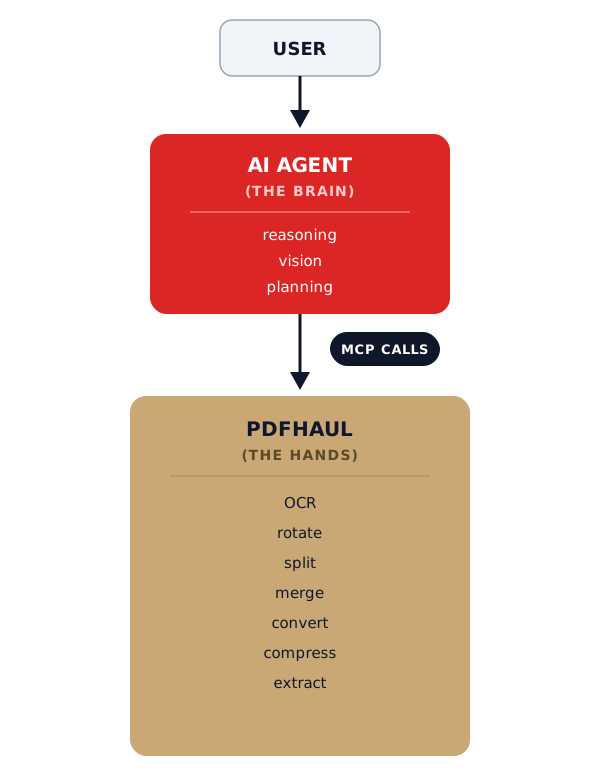
The model shouldn't be responsible for manipulating PDF bytes. And PDFHaul shouldn't have to become a general-purpose reasoning engine. The separation is clean. The brain decides. The hands execute.
Orchestration Is the Interesting Part
A single PDF operation isn't particularly exciting on its own. An intelligent sequence of them is, because the sequence is where the judgment lives.
Suppose the user says: "I downloaded this 300-page report and need to submit it to a government portal."
The brain inspects the document and determines that the file is too large, several pages are blank, some pages are duplicates, two pages have incorrect orientation, and the scanned pages aren't searchable. That's eleven distinct issues across a 300-page file, the kind of thing that would take a person the better part of an hour to catalog manually, let alone fix.
Instead of handing the user five separate tasks to do one at a time, the brain proposes the whole plan at once: "I found 11 issues. I can remove 6 blank pages, remove 3 duplicates, correct 2 orientation issues, OCR the scanned pages, and compress the final document. Proceed?"
The user says yes. The hands execute the workflow in order. What would have been an hour of tedious manual triage becomes one confirmation click and a few seconds of processing. That's the actual, felt difference between a folder of PDF utilities and the Hands/Brain Technique: not that any single operation got smarter, but that the person never had to figure out which five operations they needed or in what order to run them.
Human Approval as a Feature, Not a Compromise
There's also a natural safety model built into this split, and it's worth being explicit about it rather than treating it as an afterthought.
Some operations are low risk: compression, OCR, rendering, metadata inspection. These can run automatically without asking anyone.
Others deserve confirmation: deleting pages, redacting information, signing, changing page order, overwriting an original. These touch the substance of the document, and a wrong guess here isn't a rendering quirk, it's a missing page in a legal filing or a redaction that got applied to the wrong line.
A well-built brain distinguishes between the two categories automatically:
● Automatic: OCR 82 scanned pages.
● Automatic: Compress output from 46 MB to approximately 12 MB.
● Needs approval: "I found four probable duplicate pages. Remove them?"
This creates a useful balance between automation and control, and it's the same balance that made the insurance claim example above work. Six pages got handled without anyone lifting a finger. One page got flagged instead of guessed at. That asymmetry, confident on the easy stuff, honest about the hard stuff, is what makes the system trustworthy enough to actually deploy at volume instead of just demo well once.
The Business Opportunity Isn't “AI PDF Editing”
That positioning is too narrow, and it undersells what's actually happening.
The larger category is AI document operations. PDFs happen to be one of the most painful formats inside that category, mostly because they were designed to look right when printed, not to be parsed or reasoned about by software.
The real customers are organizations where documents arrive messy and someone has to make them usable before any downstream system, human or otherwise, can do anything with them. That includes accounting, insurance, legal, healthcare administration, government, construction, real estate, HR, procurement, and the broader BPO and document-processing industry.
In all of these environments, the expensive part was never clicking the rotate button. It was having a person figure out what needed to be clicked in the first place, at whatever volume the business runs at. The Hands/Brain Technique doesn't make the click faster. It removes the need for a person to decide which click comes next.
A Simple Test for When You Need One
There's a straightforward way to decide whether an agent is actually justified for a given task, rather than reaching for one by default because it's the interesting new tool.
If the task is "do X to this PDF," use an API. The operation is known, the input is known, there's nothing to decide.
If the task is "look at this messy collection of documents, figure out what's wrong, decide what should happen, execute the necessary operations, and tell me if anything is ambiguous," use an agent. The judgment step is the whole job.
That distinction is the entire Hands/Brain Technique in one sentence, and it's a genuinely useful filter before building or buying anything: is there a decision to make, or just an operation to run? If it's the former, you need a brain. If it's the latter, you just need hands, and adding a brain on top will only make it slower and less predictable.
How to Create an AI Agent, Step by Step
Here's the actual build, stripped down to the parts that matter. This is the same shape whether you're automating invoices, claims, or contracts.
1. Pick a reasoning model for the brain. This is whatever LLM does the looking and deciding, Claude, GPT, or similar, accessed through an agent framework or a direct MCP-compatible client like Claude Desktop or Cursor. This model never touches PDF bytes directly. Its only job is to look at a document and decide what's wrong with it.
2. Give the brain hands via an MCP server. Connect it to a PDF processing MCP server, PDFHaul is one, that exposes operations like rotate, OCR, extract tables, remove duplicates, and compress as callable tools. The brain calls these by name with specific parameters, the same way it would call any other tool. It doesn't need to know how OCR works internally, only that calling it produces a searchable page.
3. Write the decision policy, not the operations. The operations already exist in the MCP server. What you're actually building is the policy that tells the brain when to use them: how to tell a duplicate from a similar-but-different page, when a rotation is intentional versus a mistake, what confidence threshold triggers automatic action versus escalation. This policy is usually a system prompt plus a handful of worked examples, not code.
4. Separate reversible actions from destructive ones. Decide upfront which operations run automatically (OCR, compression, rendering) and which require a confirmation step (deletion, redaction, reordering, overwriting an original). Build the escalation message format now, "I found four probable duplicate pages, remove them?", rather than bolting it on after something gets deleted that shouldn't have been.
5. Test on your actual messy documents, not clean ones. A demo with a perfect PDF will always work and will teach you nothing. Feed it the worst real inputs you have, the sideways scan, the file with a stray blank page, the one with a landscape table next to portrait pages, and watch where the brain's judgment breaks down. That's where the policy from step 3 needs another pass.
6. Deploy narrow, then widen. Start with one document type and one workflow, invoice intake, say, not "all documents." Let it run with a human checking every escalation for a few weeks. Widen scope once the escalation rate on the easy cases drops to near zero and the ones it does flag are genuinely ambiguous, not things it should have caught.
That's the whole build. The hard part was never the PDF operations, those are commodity at this point. The hard part is step 3, and it's the only step that isn't just wiring two existing things together.
Applying This to Your Own Documents
If you're trying to work out whether this applies to a workflow you actually deal with, run it through four questions:
1. Does the input vary in ways you can't fully predict? Invoices from 200 different vendors, claims submitted through five different apps, discovery documents from opposing counsel you've never worked with before. If every input looks the same, you don't need a brain.
2. Is there a decision buried in the task, not just an operation? "Rotate page 4" is an operation. "Fix whatever's wrong with this scan" is a decision. If someone currently has to look at the document before acting on it, that look is the part worth automating first.
3. Is the volume high enough that per-document judgment doesn't scale? One claim a week doesn't need an agent. Two hundred a day does.
4. Can you separate the reversible steps from the risky ones? If everything the workflow does is destructive and irreversible, you need a much more conservative escalation policy before you automate any of it. If most of it is low-risk (OCR, compression) with a small set of high-risk steps (deletion, redaction, signing), you can automate the bulk and gate the rest, exactly as the insurance example did.
If your workflow answers yes to the first three and you can draw the line the fourth question asks for, you're looking at a genuine Hands/Brain Technique candidate, not just a place to bolt AI onto for its own sake.
Where This Goes
Most PDF companies are still selling buttons in 2026.
The future of PDF software isn't another application with more of them. It's a system where the user says what they want done, an AI figures out the workflow, and a remote PDF infrastructure layer quietly executes it underneath. The PDF tools become the hands. The model becomes the eyes and the brain. The user just gets the finished document, and one flagged page to glance at if something genuinely needed a human eye.
Peter
Founder of PDFHaul and Bultech
Building tools that make working with documents faster and simpler.